
Waddini
Hala Technology LLCMaps & Navigation
3.771.00 Reviews
- Version
- 5.0.12
- Installs
- 100.00K
- Age Rating
- Everyone
Screenshots
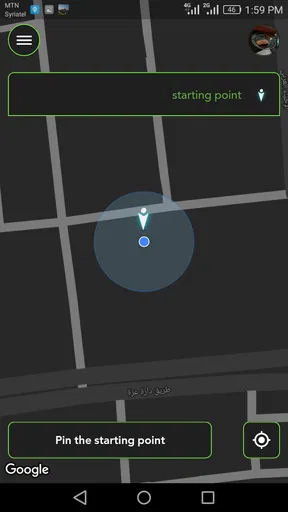
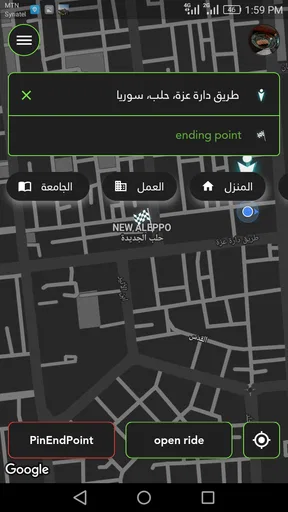
Our Review of Waddini
 Analysis by Appyee
When I look at a car-booking app, I do not judge it only by how quickly it can request a ride. I also want to understand what I am being asked to share, which choices are visible, and whether the experience gives me enough control before I commit to a trip. That is the angle I used with Waddini, a free Maps & Navigation app from Hala Technology LLC that is designed for booking cars and arranging journeys.
My overall impression is cautious but practical. The idea is straightforward: open the app when you need transportation, enter the trip details, and use the service to arrange a car. That simplicity makes it potentially useful for everyday movement, especially when I want a dedicated booking tool rather than planning a route through a general map application. At the same time, a transport app handles information connected to where I am going and when I am going there, so convenience should not be the only thing I evaluate.
Waddini has an average rating of 3.7 from around 2.2 thousand ratings, with over 100 thousand installs. Those figures suggest a real user base, but they also tell me to keep expectations measured rather than assuming a universally polished experience. It is available at no cost, carries an Everyone age rating, and runs on Android 7.0 or later. The current version is 5.0.12, which is useful context for anyone comparing an older phone with a newer device.
What the booking experience is really asking from you
I approach a car-booking app as more than a button for requesting a ride: the real test is whether I can make each choice deliberately, from the account I use to the pickup point I confirm. This section looks at how those small decisions shape a first booking and why a calm, repeatable routine matters. It also sets up the practical checks that make the experience easier to judge before relying on it for a time-sensitive trip.
A focused alternative to general map apps
The clearest reason to try Waddini is that it is built around arranging a car, not around giving you every possible way to navigate. A general map app is excellent when I want to compare walking, driving, cycling, and public transport, but it can feel unnecessarily broad when my only goal is to request a vehicle. Waddini’s narrower purpose may make the decision process easier: I am opening it because I need a ride, not because I am exploring a whole city.
That focus is also the first trade-off. If I am still deciding whether to walk, take a bus, or book a car, a broader navigation service may be more useful. Waddini makes more sense after I have already decided that a car is the appropriate option. In other words, I would treat it as a booking tool rather than a complete replacement for every travel app on my phone.
A realistic example is an evening appointment in an unfamiliar area. I may already know the destination, but I do not want to spend time comparing several transport options while getting ready. In that situation, a dedicated car-booking app can reduce mental clutter. I can prepare the pickup details, check the trip information, and keep the booking separate from my general map searches.
Trust starts before the first trip
For me, trust in a ride-booking service is not created by a colorful interface or a short description. It develops through small moments: whether the app makes the pickup point understandable, whether important trip information is easy to review, and whether I can recognize what action I am taking before I confirm it. These details matter more than a polished first screen because a mistake in a transport app can mean waiting in the wrong place or sharing the wrong destination.
I would therefore avoid rushing through the first booking. I would read each location field carefully, especially when a building has several entrances or when the pickup area is busy. A useful habit is to identify a landmark near the pickup point and check that the selected location matches where a driver could realistically stop. This is a practical safeguard, not a feature claim: the accuracy of the trip depends heavily on the information I enter.
The app’s public rating gives me a reason to test it gradually instead of relying on it immediately for an important appointment. My first use would be a simple, non-urgent journey where I have extra time. That lets me learn the booking flow, observe how clearly the trip is presented, and decide whether the service fits my routine before I depend on it for an airport departure, medical visit, or time-sensitive meeting.
Controls and choices deserve attention
Because Waddini is a location-based transport app, I pay close attention to the choices presented during setup and use. I do not assume that every permission or account request is automatically necessary, and I do not grant access casually. I would review the permission prompts on my device and allow only what I understand to be relevant to the booking process. If I am unsure why a request appears, I would pause and inspect the phone’s app settings rather than accepting it reflexively.
This approach is especially important on a shared or family device. A person booking a car should know which account is active and which phone number or profile is connected to the request. Before confirming a journey, I would check that I am signed into my own account and that the destination is not being carried over from someone else’s previous use. The most useful privacy habit here is simple: separate account identity, location choice, and trip confirmation instead of treating them as one automatic step.
I also prefer to keep a clear boundary between necessary trip information and optional personal details. A car booking needs enough information to connect the passenger, pickup point, and destination, but I would avoid adding extra notes that reveal more about my routine than the driver needs. For example, I would describe a meeting point clearly without including sensitive personal context. That keeps the booking useful while limiting unnecessary exposure.
When location information becomes sensitive
Every ride request can reveal a pattern: where I start, where I finish, and roughly when I travel. Some destinations are particularly private, such as a workplace, school, clinic, or someone else’s home. I would think about that before placing a booking, especially if I am using a device that other people can access or an account that is not exclusively mine.
One practical workflow is to prepare the trip only when I am ready to confirm it, rather than leaving a sensitive destination sitting on the screen for a long period. After the journey, I would review the app’s account and device settings and remove saved information that I no longer need, if the interface provides that control. I would also avoid taking screenshots of booking details unless there is a clear reason, because screenshots can remain in a photo library or cloud backup long after the ride is over.
These steps do not make a transport app anonymous, and I would not pretend they do. They simply give me more awareness of the information involved. The important point is that convenience should not make me forget that a booking is connected to real-world movement.
Account ownership and everyday agency
I want to remain the person making the decision at each important stage. That means knowing which account is being used, checking the pickup and destination before confirmation, and understanding what happens on the screen after I request a car. If I am booking for another person, I would double-check whose phone and contact details are associated with the trip. A small identity mistake can create confusion at pickup, particularly when several people are waiting in the same area.
For families, the app may be useful only if everyone agrees on a clear process. I would not let a child casually use an adult account to arrange a journey without supervision, even though the app is rated Everyone. An age rating describes audience suitability; it does not replace an adult’s responsibility for account access, payment decisions, or travel arrangements. On a shared phone, I would also make sure the next user can tell whether a previous booking is still active.
The same principle applies when arranging a ride for a guest or colleague. I would communicate the exact pickup point separately rather than assuming the app alone will solve every coordination problem. A booking tool can organize the request, but people still need to agree on where to meet and how to recognize the correct vehicle or passenger. Clear communication reduces the chance of exposing someone’s location unnecessarily or sending a car to the wrong entrance.
How I would test it without taking unnecessary risks
My first trial would follow a deliberate sequence. I would install the app on a supported Android phone, inspect the initial account and permission screens, and then choose a short journey with a flexible arrival time. I would enter the pickup point slowly, compare it with the physical surroundings, and review the destination before confirming anything. This first trip is not just a ride; it is a way to learn how much information the app displays and how easy it is to correct an error.
I would keep the phone charged and maintain another way to contact the person I am meeting. That is sensible for any transport service, particularly while I am still learning how a specific app behaves. I would also note whether the interface makes it obvious that a request has been submitted, whether active trip information remains easy to find, and whether cancelling or changing my plan is understandable. I am not assuming that every version handles these moments identically; I am saying they are the moments I would inspect before relying on the service.
A second useful test is to book at a quiet time and then repeat the process when I am under mild pressure, such as leaving for an appointment. Some apps feel simple during a relaxed trial but become confusing when I am watching the clock. If the pickup instructions or confirmation state are difficult to interpret, I would choose a more familiar alternative for important travel rather than forcing myself to use Waddini.
Where it may fit better than the usual alternatives
Waddini’s strongest potential advantage is concentration. A general map app may show many routes and services, while a traditional taxi call may require a phone conversation. A dedicated booking app sits between those options: it can be more structured than calling and less distracting than a full navigation platform. For someone who frequently chooses car travel and prefers handling requests on a phone, that focused role may be appealing.
However, the better option depends on the situation. I would choose a broad map service when route comparison is the main task. I would prefer a local taxi provider when I need a service with a well-established phone-based process in a particular area. I would also avoid relying on Waddini as my only plan if I have not yet tested its booking flow or if the trip is too important to tolerate uncertainty. The app can be a useful part of a transport routine without being the right answer for every journey.
Another trade-off concerns familiarity. An app with a smaller or more localized audience may be exactly what some riders need, but a traveler who moves between many regions may value a service they already know across different locations. I would judge Waddini by how well it matches my actual travel area and habits, not by assuming that one booking app will work equally well for every destination.
What the rating tells me, and what it does not
The 3.7 average is neither a reason to dismiss the app nor a guarantee that my experience will be smooth. Ratings combine different phones, locations, expectations, and trip circumstances. A person who uses the app regularly may care about different details from someone who tried it once during a busy period. I read the rating as a prompt to test the app personally, with particular attention to the booking confirmation and account controls.
The app has been available since April 24, 2021, and its current release is 5.0.12. That gives me confidence that it is not a brand-new experiment, but age alone does not answer questions about present-day reliability or privacy choices. I would still inspect the current experience on my own device and keep the app updated through the normal store process. The minimum Android requirement of 7.0 also means that compatibility is reasonably broad for older supported phones, although device performance can still vary.
Who should try it and who should skip it
I can see Waddini working well for someone who wants a straightforward way to arrange car trips, prefers a dedicated transport app, and is willing to spend a little time checking the account and location details. It may also suit users who want a free app to test without committing to a purchase. The Everyone rating makes it broadly approachable, but responsible account use still matters for younger users and shared devices.
I would skip it, at least initially, if I need a complete travel planner, detailed route comparison, or a service I already know works across many different regions. I would also hesitate if I am uncomfortable reviewing location access and account settings, because a booking app is a poor fit when I want to avoid thinking about those choices entirely. For urgent travel, I would use whichever transport option I have already tested successfully rather than experimenting at the last minute.
My cautious verdict
Waddini is best understood as a focused car-booking app rather than a universal navigation replacement. Hala Technology LLC has positioned it for arranging trips, and that narrow purpose can be convenient when I already know I want a car. Its free price and broad Android compatibility lower the barrier to trying it, while the established install base shows that it has reached a meaningful number of users.
My recommendation is conditional: try it with a low-pressure journey, review every location and account choice, and decide whether the interface gives you enough confidence before depending on it for something important. The most responsible way to use Waddini is to treat convenience and control as equally important. If the booking flow feels clear and the service matches your area, it could become a practical addition to your travel tools. If you need richer navigation, broader regional coverage, or a thoroughly familiar backup, a general map app or established local taxi option may still be the better choice.
In my view, Waddini is worth testing, but not blindly trusting. The app can simplify the act of arranging a car, yet the quality of the experience depends on careful pickup details, sensible account habits, and knowing when another transport option is more appropriate. That balanced approach lets me benefit from its focused design without handing over more confidence than the real-world booking experience has earned.
Verdict
Strengths of Waddini
- Simple interface makes browsing local listings quick and straightforward.
- Useful for discovering nearby services, offers, or activities in one place.
- Location-focused content can help users find relevant options faster.
- Convenient contact or inquiry features reduce the need for separate searches.
- Suitable for users who prefer a local platform over broad global marketplaces.
Limitations of Waddini
- Listing quality may vary depending on the activity of local businesses.
- Some areas may have fewer listings or limited app usefulness.
- Information can become outdated if providers do not update their profiles.
- The app may require location access for its main features to work well.
- Availability of offers and services may differ considerably by region.
Similar Picks in This Category
View All
Uber - Request a ride
Uber Technologies, Inc.4.7


inDrive. Rides with fair fares
® SUOL INNOVATIONS LTD4.8

Yandex Go: Taxi Food Delivery
Mikromobilnost LLC Belgrade4.8

Bolt: Request a Ride
Bolt Technology4.8

Rapido: Bike-Taxi, Auto & Cabs
Rapido Bike Taxi4.8
Frequently Asked Questions
What is Waddini and what can I use it for?
Waddini is an app designed to help users discover and interact with its available digital services in one place. Depending on the version and region, it may provide tools for browsing content, managing activities, communicating with other users, or accessing platform-specific features. Before downloading, review the store description carefully because available functions can vary by country, device, and app updates.
Is Waddini free to download and use?
Waddini may be available as a free download, but some features or services could require in-app purchases, subscriptions, registration, or additional fees. The presence of paid options can also depend on your location and the version installed. I recommend checking the Google Play Store or Apple App Store listing for current pricing, billing terms, renewal conditions, and whether the app includes advertisements.
Does Waddini require an account or personal information?
Some Waddini features may be accessible without creating an account, while others can require registration to save preferences, use personalized services, or communicate through the platform. During setup, the app may request information such as an email address, phone number, profile details, or permission to send notifications. Read the privacy policy before submitting sensitive information and only grant permissions that are necessary.
Is Waddini safe to install on Android and iPhone?
The safest way to install Waddini is through its official Google Play Store or Apple App Store listing rather than downloading an unofficial APK or modified version. Before installation, check the developer name, recent reviews, update history, privacy disclosures, and requested permissions. Keep your operating system updated, avoid sharing unnecessary data, and contact official support if you notice suspicious behavior.
What should I check if Waddini does not work properly?
If Waddini crashes, loads slowly, or fails to display content, first confirm that your internet connection is stable and that the app is updated. Restarting the app or device and clearing temporary data may also help, particularly on Android. If the problem continues, check device compatibility, available storage, and service status, then contact the developer through the official store page with your device model and app version.
